
Registration
FD999 Game registration allows new users to create a personal gaming account, set a password, receive an account ID, and access available games and wallet features. The process usually takes only a few minutes, but users should enter their information carefully. A wrong mobile number, weak password, or incorrect payment name can cause login and withdrawal problems later.
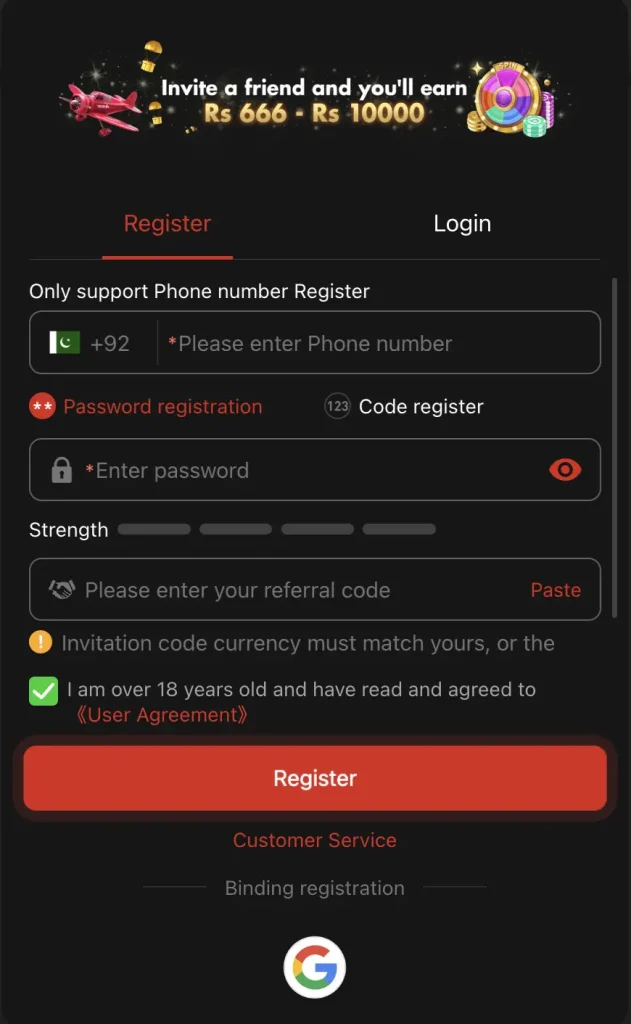
This complete guide explains the account requirements, registration process, OTP verification, referral codes, common errors, and essential security steps. Users should confirm the current form and age rules on FD999APP.PK because the operator may update its requirements.
What You Need Before Registration
Prepare the following items before creating your account:
- An active mobile number that belongs to you
- A strong and unique password
- Reliable internet access
- An Android phone or supported browser
- A valid referral code, if you choose to use one
- Accurate identity details if the platform requests verification
- Confirmation that you meet the required legal age
Do not use a temporary number or another person’s payment account. Your account details should match the information you may later use for verification and withdrawals.
How to Register on FD999 Game
Follow these steps to create an account:
- Open the verified FD999 app or website.
- Tap Register, Sign Up, or Create Account.
- Enter your active mobile number.
- Create a strong login password.
- Re-enter the password if the form requests confirmation.
- Add a referral code only when you trust its source.
- Read the Terms and Conditions and Privacy Policy.
- Tick the age and policy agreement boxes.
- Tap Register to submit the form.
- Enter the OTP if FD999 sends a verification code.
After registration, save your account ID in a secure place. Do not post a screenshot that reveals your number, balance, referral code, or personal information.
How to Create a Secure Password
Choose a password that you do not use on Facebook, Gmail, JazzCash, Easypaisa, or another gaming account. A good password includes:
- At least 10 characters
- Uppercase and lowercase letters
- Numbers
- A symbol when the app accepts one
- No name, birthday, phone number, or simple sequence
Avoid passwords such as 123456, password, or your mobile number. A unique password limits the damage if another website suffers a data breach.
How OTP Verification Works
FD999 may send a one-time password to confirm your mobile number. Enter the code inside the official registration screen. The code usually expires after a short period.
Never share an OTP with support, a referral agent, a social-media contact, or someone who claims to verify your account. Anyone with the code may gain access to your account or reset your password.
If the OTP does not arrive, check your number, mobile signal, blocked messages, and SIM status. Wait briefly before requesting another code. Too many requests may trigger a temporary limit.
Should You Use an FD999 Referral Code?
A referral code may connect your new account with an existing user or promotional campaign. The platform may offer a reward after registration, deposit, or qualifying activity. However, a code does not guarantee free withdrawable money.
Read these details before using a referral:
- Who receives the reward?
- Does the new user need to deposit?
- Does wagering apply before withdrawal?
- Does the bonus expire?
- Which games qualify?
- Can FD999 cancel the reward?
Leave the field empty if the platform makes it optional and you do not trust the code source.
What to Do After Registration
Complete these actions before depositing money:
- Confirm your registered number and account ID.
- Add account-recovery information if FD999 supports it.
- Review the privacy and withdrawal rules.
- Find the responsible-gaming or spending-limit tools.
- Check the current payment methods and minimum amounts.
- Contact official support with one simple question to test its response.
- Start with a small payment only after checking the operator.
If FD999 asks for identity verification, inspect the upload page and privacy policy first. Do not send a CNIC photo through an unknown WhatsApp number.
How to Log In After Registration
Open FD999 and tap Login. Enter the mobile number and password you used during registration. Check the number format and keyboard settings if the app rejects your details.
Use the official Forgot Password option when you cannot remember the password. Complete the reset yourself and create a new unique password. Never pay an agent to recover or unlock your account.
Common Registration Problems and Solutions
| Problem | Possible Cause | Solution |
| Mobile number already exists | You created an earlier account | Use Login or the password-reset option |
| OTP does not arrive | Wrong number or network delay | Check the number and request one new code |
| Weak password error | Password does not meet the rules | Add letters, numbers, length, and a symbol |
| Referral code fails | Invalid, expired, or mistyped code | Check the code or leave the optional field empty |
| Registration button does nothing | Connection, browser, or server issue | Refresh, change connection, and try once more |
| Account becomes restricted | Duplicate details or policy review | Contact verified FD999 support and request the reason |
Registration Safety Tips
- Create only one account unless the terms allow more.
- Never share your password or OTP.
- Do not let a referral agent create the account for you.
- Use information that matches your own payment account.
- Avoid public Wi-Fi during registration and payments.
- Save the official support contact and ignore copied profiles.
- Review all permissions before using the Android app.
Final Words
FD999 registration looks simple, but accurate details and strong account security can prevent future problems. Register through the verified platform, use your own number, create a unique password, and protect every OTP. Read the payment and bonus rules before you add money.
FD999 Registration FAQs
Do I need a mobile number to register?
FD999 commonly uses a mobile number for registration, login, OTP verification, account recovery, and security notices.
Can I register more than one FD999 account?
Check the current terms because duplicate accounts may trigger restrictions, cancelled bonuses, or withdrawal reviews.
Is a referral code required?
The field may remain optional, but users should confirm the live registration form and promotion conditions.
Why does FD999 reject my password?
Your password may lack the required length, letter combination, number, symbol, or acceptable character format.
Can another person register for me?
You should create your own account to protect your password, OTP, identity details, and future withdrawals.