
Withdraw
The FD999 Game withdrawal feature allows eligible users to request money from their available wallet balance. Players may need to complete account verification, meet the minimum withdrawal, finish bonus turnover, and use a payment account that matches their identity. Missing any requirement can delay or reject a request.
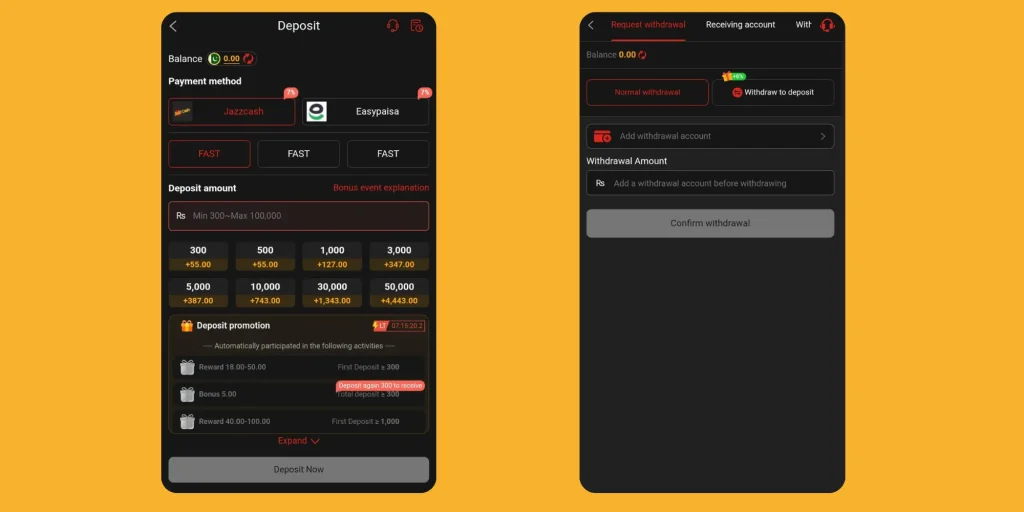
This guide explains how to submit an FD999 withdrawal, check the available balance, select a payment method, solve pending requests, and avoid payment scams. Because limits and processing rules can change, confirm every figure on the live withdrawal page before submitting your request.
Requirements Before Withdrawing
Check these items first:
- Your mobile number and account details remain correct.
- Your account has no unresolved security restriction.
- Your withdrawable balance meets the current minimum.
- You completed any required identity verification.
- You satisfied the active bonus or wagering rules.
- Your payment account belongs to you.
- Your withdrawal information matches your FD999 profile.
- You reviewed the fee and processing estimate.
An app may display separate cash, bonus, locked, and withdrawable balances. Only the amount marked as available for withdrawal normally qualifies for a request.
How to Withdraw Money from FD999 Game
Follow these general steps:
- Log in to the verified FD999 app or website.
- Open Wallet, Cashier, or Withdraw.
- Review your withdrawable balance.
- Select an available payment method.
- Enter your own JazzCash, Easypaisa, or bank account details when listed.
- Enter an amount within the current limits.
- Review the fee, account information, and processing notice.
- Enter your withdrawal password or OTP if required.
- Tap Submit once.
- Save the request ID and monitor its status.
Make a small test withdrawal before requesting a large amount. This approach helps you confirm the payment route, identity match, processing, and support response.
How to Withdraw Through JazzCash or Easypaisa
When the FD999 cashier lists JazzCash or Easypaisa, select the correct service and enter the mobile-wallet number registered in your name. Double-check each digit because a wrong number may send funds to another account or cause rejection.
FD999 may ask you to verify the request through an OTP or withdrawal password. Complete that step only inside the official app. Never give an OTP, wallet PIN, or screen-sharing access to a support representative.
FD999 Withdrawal Status Explained
| Status | Meaning | What You Should Do |
| Submitted | FD999 received the request | Save the request number and wait |
| Pending | The platform has not completed the review | Check the estimated time and avoid duplicate requests |
| Processing | The payment has entered the payout process | Continue monitoring the transaction history |
| Completed | FD999 marks the payment as sent | Check your wallet or bank account |
| Rejected | The request failed a rule or account check | Read the stated reason and correct the information |
| Cancelled | You or the platform stopped the request | Confirm that the amount returned to your balance |
A “completed” status does not always mean the payment appears instantly. Payment providers can take additional time to post a transfer.
Why FD999 May Reject a Withdrawal
Common reasons include:
- The amount falls below the minimum limit.
- The account has not completed required verification.
- Payment details do not match the registered information.
- The user has not completed bonus turnover.
- The account contains duplicate or suspicious activity.
- The request exceeds a daily or transaction limit.
- The payment method has a temporary service problem.
- The user entered the wrong withdrawal password or OTP.
Read the rejection message carefully. Correct only the stated issue and use official support when the reason remains unclear.
What to Do When an FD999 Withdrawal Stays Pending
Use these steps:
- Check the submission time and estimated processing period.
- Review the bonus, identity, and withdrawal requirements.
- Confirm that your payment details remain correct.
- Save screenshots of the balance, request, and transaction history.
- Contact support through the verified app or website.
- Provide the request ID, amount, date, and account ID.
- Ask for a written reason and expected next action.
- Avoid new deposits until the platform resolves the request.
Never pay a “release fee,” “tax,” “security deposit,” or “VIP upgrade” to unlock an existing withdrawal. A legitimate fee should appear clearly in the written rules and transaction screen, not arrive through a private message after your request.
How to Protect Your Withdrawal Account
- Use your own payment number and real account details.
- Create a separate withdrawal password when FD999 supports one.
- Never share an OTP, wallet PIN, or login password.
- Do not allow anyone to control your phone remotely.
- Keep transaction screenshots until payment arrives.
- Log out when using a shared device.
- Change your password after any suspicious login.
- Stop using the platform if it repeatedly changes its withdrawal rules.
Responsible Withdrawal Tips
Withdraw eligible funds instead of immediately replaying the full balance. Keep gaming money separate from rent, food, fees, and emergency savings. Do not increase deposits because a request remains pending.
Casino-style games cannot guarantee steady earnings. Set both spending and time limits. Take a break if losses make you angry, anxious, or determined to recover money quickly.
Final Words
An FD999 withdrawal should follow clear written rules from request to payment. Confirm your available balance, account details, limits, fees, and bonus conditions before submitting. Save evidence and use verified support if a request remains pending. Never send more money to unlock money that the platform already owes you.
FD999 Withdrawal FAQs
What is the minimum FD999 withdrawal?
The minimum may change, so check the live withdrawal page before submitting a payment request.
How long does an FD999 withdrawal take?
Timing depends on verification, payment method, servers, review queues, weekends, and the platform’s current processing rules.
Why did FD999 reject my withdrawal?
Common causes include incorrect details, incomplete verification, bonus turnover, transaction limits, or a payment-service problem.
Can I cancel a pending FD999 withdrawal?
The current cashier rules determine cancellation availability; check the request page or contact verified support.
Should I pay a fee to unlock my withdrawal?
Never send an unexpected private payment to unlock funds; verify every legitimate charge in written platform terms.